用子比主题的人很多,但是很多人都会遇到一个情况,就是WordPress的自动地图页面,有的人可以生成,但是有的人却报错,报错也不知道什么原因,那么今天我来记录一下! 定位:根目录/wp-blog-header.php文件,进去之后加两行代码,其实这两行代码分别为ob_start()和ob_end_clean()代码,如果不加这两行代码我们加载WordPress的时候会输出一些一些警告信息,这些内容会弄的把我们的地图格式会不显示,所以看到的报错,加上之后就删掉了这些警告,然后就剩下了地图,我是这样理解的,话不多说直接开始,你直接将下面的代码全部替换你的那个文件的代码! <?php /** * Loads the WordPress environment and template. * * @package WordPress */ if ( ! isset( $wp_did_header ) ) { $wp_did_header = true; ob_start(); // Load the WordPress library. require_once __DIR__ . '/wp-load.php'; // Set up the WordPress query. wp(); ob_end_clean(); // Load the theme template. require_once ABSPATH . WPINC . '/template-loader.php'; }
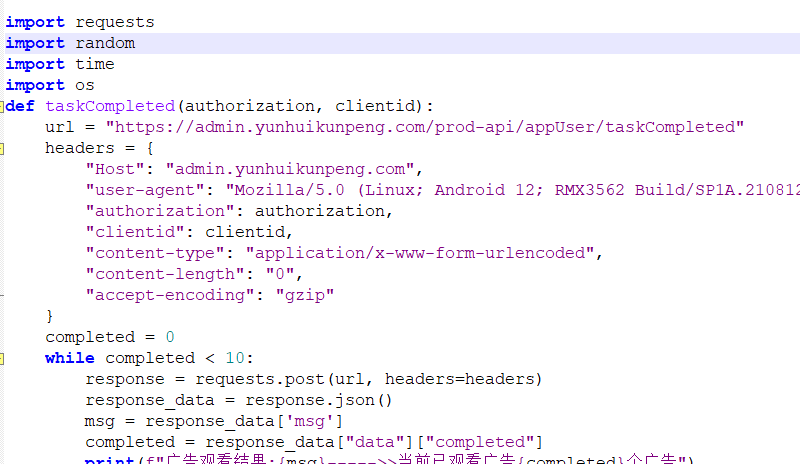
青龙面板爽歪歪短剧刷取贡献币脚本,算是一个分虹平台,每天协议刷取贡献币获取会员参与平台分红,脚本未在青龙测试有bug。 变量:authorization&clientid多号@隔开 定时:看个人 下载地址 [xcxyzm]Nwvi[/xcxyzm] [sv] 本地下载 [/sv]
WordPress在文章内容中对文字加模糊隐藏效果,你可以放一些提取码,或者提示信息,甚至是一些秘密。。。实现也很简单,单纯css就可以了。 教程开始: 首先来到 后台 => 外观 => 自定义 => 额外CSS 如图: 将以下CSS代码加进去: [xcxyzm]tmxJ[/xcxyzm] [sv] .wponss { text-decoration: none; transition: filter 150ms ease-in-out; transition-delay: 500ms; filter: blur(4px); } .wponss:hover {filter: blur(0); transition-delay: 0ms; /*WPon UI MImi MiWen*/ } [/sv] 然后当你在文章里添加密文的时候,直接在前后加上即可。 <wponss>这里是密文...</wponss>
青龙面板Python 今天第几周(全年) 爬取网页数据,每周开会做PPT要知道今天是今年第几周,放青龙面板每天推送给自己微信。 [xcxyzm]jTVw[/xcxyzm] [sv] import requests from bs4 import BeautifulSoup import notify url = "https://m.tthuangli.com/" import requests from bs4 import BeautifulSoup url = "https://m.tthuangli.com/" # 发送 HTTP GET 请求 response = requests.get(url) # 检查请求是否成功 if response.status_code == 200: # 使用 BeautifulSoup 解析 HTML 内容 soup = BeautifulSoup(response.content, "html.parser") # 查找包含日期的<span>标签 date_span = soup.find("span", class_="nowday") # 查找第17周的第三个<p>标签 second_color_paragraphs = soup.find_all("p", class_="second_color") week_text = "" if len(second_color_paragraphs) >= 3: week_text = second_color_paragraphs[2].get_text(strip=True) # 查找农历年份的<div>标签 nong_li_nian_div = soup.find("div", class_="nong_li_nian") # 查找星期的<div>标签 zhong_week_div = soup.find("div", class_="zhong_week") # 初始化变量 date_text = "" nong_li_nian_text = "" zhong_week_text = "" # 提取日期信息 if date_span: date_text = date_span.get_text(strip=True) # 提取农历年份信息 if nong_li_nian_div: nong_li_nian_text = nong_li_nian_div.get_text(strip=True) # 提取星期信息 if zhong_week_div: zhong_week_text = zhong_week_div.get_text(strip=True) # 格式化输出合并的信息 combined_result = f"日期: {date_text} 周期: {week_text}\n农历: {nong_li_nian_text} 星期: {zhong_week_text}" print("提取到的结果:", combined_result) notify.send("今日第几周", combined_result) else: print("请求失败,状态码:", response.status_code) notify.send("今日第几周", response.status_code) [/sv]
偶然发现小米官网的字体无防盗链 可以直接使用,而且小米还储存了思源宋体 为什么用别人的字体?本地储存字体加载起来很慢,自己服务器慢的话那就可想而知了,所以我们可以利用小米官网储存的字体加速,看链接就知道这是小米官网,放心使用~ 链接中的400,600,700 可以去除其中一个,分别对应字体的粗细,看自己需求 包含小米字体,思源宋字体,程序员专用字体 [xcxyzm]3Zye[/xcxyzm] [sv] 小米字体 //css引用 <link rel="stylesheet" href="https://font.sec.miui.com/font/css?family=MiSans:400,700:MiSans" /> //css调用 * {font-family: MiSans} 思源宋字体 //css引用 <link rel="stylesheet" href="https://font.sec.miui.com/font/css?family=Source_Han_Serif:400,600:Source_Han_Serif" /> //css调用 * {font-family: Source Han Serif} 程序员专用字体 //css引用 <link rel="stylesheet" href="https://fonts.googleapis.com/css?family=Open+Sans:400,400i,600,700,700i" /> //css调用 * {font-family: Open Sans} [/sv]
很多网站使用了Pjax无刷新加载 顶部没有页面加载进度,为了美观丶流畅感觉可以加进去,分享写个教程给大家 建一个css文件 引入,把以下css代码放进去 #nprogress{pointer-events:none} #nprogress .bar{background:#73aaff;position:fixed;z-index:99999;top:0;left:0;width:100%;height:2px;} #nprogress .peg{display:block;position:absolute;right:0;width:100px;height:100%;opacity:1;transform:rotate(3deg) translate(0,-4px);} 加入pjax 重载函数 $(document).on('pjax:send', function() { NProgress.start() }); $(document).on("pjax:complete", function () { NProgress.done(); }); 最后创建一个js文件引入(把以下js代码放进去)引入到jquery.js的下面。 [xcxyzm]gutF[/xcxyzm] [sv] !(function (n, e) { "function" == typeof define && define.amd ? define(e) : "object" == typeof exports ? (module.exports = e()) : (n.NProgress = e()); })(this, function () { function n(n, e, t) { return e > n ? e : n > t ? t : n; } function e(n) { return 100 * (-1 + n); } function t(n, t, r) { var i; return ( (i = "translate3d" === c.positionUsing ? { transform: "translate3d(" + e(n) + "%,0,0)" } : "translate" === c.positionUsing ? { transform: "translate(" + e(n) + "%,0)" } : { "margin-left": e(n) + "%" }), (i.transition = "all " + t + "ms " + r), i ); } function r(n, e) { var t = "string" == typeof n ? n : o(n); return t.indexOf(" " + e + " ") >= 0; } function i(n, e) { var t = o(n), i = t + e; r(t, e) || (n.className = i.substring(1)); } function s(n, e) { var t, i = o(n); r(n, e) && ((t = i.replace(" " + e + " ", " ")), (n.className = t.substring(1, t.length - 1))); } function o(n) { return (" " + (n.className || "") + " ").replace(/\s+/gi, " "); } function a(n) { n && n.parentNode && n.parentNode.removeChild(n); } var u = {}; u.version = "0.2.0"; var c = (u.settings = { minimum: 0.08, easing: "ease", positionUsing: "", speed: 200, trickle: !0, trickleRate: 0.02, trickleSpeed: 800, showSpinner: !0, barSelector: '[role="bar"]', parent: "body", template: '<div class="bar" role="bar"><div class="peg"></div></div></div>' }); (u.configure = function (n) { var e, t; for (e in n) (t = n[e]), void 0 !== t && n.hasOwnProperty(e) && (c[e] = t); return this; }), (u.status = null), (u.set = function (e) { var r = u.isStarted(); (e = n(e, c.minimum, 1)), (u.status = 1 === e ? null : e); var i = u.render(!r), s = i.querySelector(c.barSelector), o = c.speed, a = c.easing; return ( i.offsetWidth, l(function (n) { "" === c.positionUsing && (c.positionUsing = u.getPositioningCSS()), f(s, t(e, o, a)), 1 === e ? (f(i, { transition: "none", opacity: 1 }), i.offsetWidth, setTimeout(function () { f(i, { transition: "all " + o + "ms linear", opacity: 0 }), setTimeout(function () { u.remove(), n(); }, o); }, o)) : setTimeout(n, o); }), this ); }), (u.isStarted = function () { return "number" == typeof u.status; }), (u.start = function () { u.status || u.set(0); var n = function () { setTimeout(function () { u.status && (u.trickle(), n()); }, c.trickleSpeed); }; return c.trickle && n(), this; }), (u.done = function (n) { return n || u.status ? u.inc(0.3 + 0.5 * Math.random()).set(1) : this; }), (u.inc = function (e) { var t = u.status; return t ? ("number" != typeof e && (e = (1 - t) * n(Math.random() * t, 0.1, 0.95)), (t = n(t + e, 0, 0.994)), u.set(t)) : u.start(); }), (u.trickle = function () { return u.inc(Math.random() * c.trickleRate); }), (function () { var n = 0, e = 0; u.promise = function (t) { return t && "resolved" !== t.state() ? (0 === e && u.start(), n++, e++, t.always(function () { e--, 0 === e ? ((n = 0), u.done()) : u.set((n - e) / n); }), this) : this; }; })(), (u.render = function (n) { if (u.isRendered()) return document.getElementById("nprogress"); i(document.documentElement, "Progress-bar"); var t = document.createElement("div"); (t.id = "nprogress"), (t.innerHTML = c.template); var r, s = t.querySelector(c.barSelector), o = n ? "-100" : e(u.status || 0), l = document.querySelector(c.parent); return ( f(s, { transition: "all 0 linear", transform: "translate3d(" + o + "%,0,0)" }), c.showSpinner || ((r = t.querySelector(c.spinnerSelector)), r && a(r)), l != document.body && i(l, "nprogress-custom-parent"), l.appendChild(t), t ); }), (u.remove = function () { s(document.documentElement, "Progress-bar"), s(document.querySelector(c.parent), "nprogress-custom-parent"); var n = document.getElementById("nprogress"); n && a(n); }), (u.isRendered = function () { return !!document.getElementById("nprogress"); }), (u.getPositioningCSS = function () { var n = document.body.style, e = "WebkitTransform" in n ? "Webkit" : "MozTransform" in n ? "Moz" : "msTransform" in n ? "ms" : "OTransform" in n ? "O" : ""; return e + "Perspective" in n ? "translate3d" : e + "Transform" in n ? "translate" : "margin"; }); var l = (function () { function n() { var t = e.shift(); t && t(n); } var e = []; return function (t) { e.push(t), 1 == e.length && n(); }; })(), f = (function () { function n(n) { return n .replace(/^-ms-/, "ms-") .replace(/-([\da-z])/gi, function (n, e) { return e.toUpperCase(); }); } function e(n) { var e = document.body.style; if (n in e) return n; for ( var t, r = i.length, s = n.charAt(0).toUpperCase() + n.slice(1); r--; ) if (((t = i[r] + s), t in e)) return t; return n; } function t(t) { return (t = n(t)), s[t] || (s[t] = e(t)); } function r(n, e, r) { (e = t(e)), (n.style[e] = r); } var i = ["Webkit", "O", "Moz", "ms"], s = {}; return function (n, e) { var t, i, s = arguments; if (2 == s.length) for (t in e) (i = e[t]), void 0 !== i && e.hasOwnProperty(t) && r(n, t, i); else r(n, s[1], s[2]); }; })(); return u; }); [/sv]
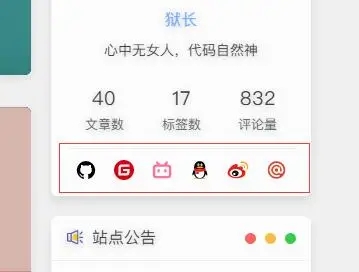
很多网站博客在使用这种美化,图标醒目,比较好看,可以自行更换SVG阿里矢量图标,以下代码放置在自己适合的位置即可,Xc主题直接放置在文件路径 Xc/public/aside.php 23行下面即可。 [xcxyzm]TNFt[/xcxyzm] [sv] <div class="Xc_contact-information" style="display: flex;-webkit-box-align: center;align-items: center;justify-content: space-around;padding-top: 10px;"> <a class="github" href="这里填写Github地址" target="_blank" title="Github" rel="noopener noreferrer nofollow"> <svg viewBox="0 0 1024 1024" version="1.1" xmlns="http://www.w3.org/2000/svg" width="22" height="22"><path d="M512 95.872a426.666667 426.666667 0 0 0-134.912 831.445333c21.333333 3.754667 29.312-9.045333 29.312-20.266666 0-10.112-0.512-43.733333-0.512-79.445334-107.221333 19.712-134.954667-26.154667-143.488-50.133333a155.136 155.136 0 0 0-43.733333-60.288c-14.933333-7.978667-36.266667-27.733333-0.554667-28.245333a85.376 85.376 0 0 1 65.621333 43.733333 91.178667 91.178667 0 0 0 124.245334 35.2 89.770667 89.770667 0 0 1 27.221333-57.088c-94.933333-10.666667-194.133333-47.445333-194.133333-210.645333a166.058667 166.058667 0 0 1 43.733333-114.688 153.344 153.344 0 0 1 4.266667-113.066667s35.712-11.178667 117.333333 43.733333a402.218667 402.218667 0 0 1 213.333333 0c81.578667-55.466667 117.333333-43.733333 117.333334-43.733333a153.301333 153.301333 0 0 1 4.266666 113.066667 165.077333 165.077333 0 0 1 43.733334 114.688c0 163.712-99.754667 199.978667-194.688 210.645333a101.034667 101.034667 0 0 1 28.8 78.933333c0 57.088-0.512 102.954667-0.512 117.333334 0 11.221333 7.978667 24.533333 29.312 20.266666A426.88 426.88 0 0 0 512 95.872z" fill="var(--title)"></path></svg> </a> <a class="gitee" href="这里填写Gitee地址" target="_blank" title="Gitee" rel="noopener noreferrer nofollow"> <svg viewBox="0 0 1024 1024" version="1.1" xmlns="http://www.w3.org/2000/svg" width="20" height="20"><path d="M512 1024C229.248 1024 0 794.752 0 512S229.248 0 512 0s512 229.248 512 512-229.248 512-512 512z m259.168-568.896h-290.752a25.28 25.28 0 0 0-25.28 25.28l-0.032 63.232c0 13.952 11.296 25.28 25.28 25.28h177.024a25.28 25.28 0 0 1 25.28 25.28v12.64a75.84 75.84 0 0 1-75.84 75.84h-240.224a25.28 25.28 0 0 1-25.28-25.28v-240.192a75.84 75.84 0 0 1 75.84-75.84h353.92a25.28 25.28 0 0 0 25.28-25.28l0.064-63.2a25.312 25.312 0 0 0-25.28-25.312H417.184a189.632 189.632 0 0 0-189.632 189.6v353.952c0 13.952 11.328 25.28 25.28 25.28h372.928a170.656 170.656 0 0 0 170.656-170.656v-145.376a25.28 25.28 0 0 0-25.28-25.28z" fill="#d90013"></path></svg> </a> <a class="bilibili" href="这里填写B站地址" target="_blank" title="B站" rel="noopener noreferrer nofollow"> <svg viewBox="0 0 1024 1024" version="1.1" xmlns="http://www.w3.org/2000/svg" width="22" height="22"><path d="M777.514667 131.669333a53.333333 53.333333 0 0 1 0 75.434667L728.746667 255.829333h49.92A160 160 0 0 1 938.666667 415.872v320a160 160 0 0 1-160 160H245.333333A160 160 0 0 1 85.333333 735.872v-320a160 160 0 0 1 160-160h49.749334L246.4 207.146667a53.333333 53.333333 0 1 1 75.392-75.434667l113.152 113.152c3.370667 3.370667 6.186667 7.04 8.448 10.965333h137.088c2.261333-3.925333 5.12-7.68 8.490667-11.008l113.109333-113.152a53.333333 53.333333 0 0 1 75.434667 0z m1.152 231.253334H245.333333a53.333333 53.333333 0 0 0-53.205333 49.365333l-0.128 4.010667v320c0 28.117333 21.76 51.157333 49.365333 53.162666l3.968 0.170667h533.333334a53.333333 53.333333 0 0 0 53.205333-49.365333l0.128-3.968v-320c0-29.44-23.893333-53.333333-53.333333-53.333334z m-426.666667 106.666666c29.44 0 53.333333 23.893333 53.333333 53.333334v53.333333a53.333333 53.333333 0 1 1-106.666666 0v-53.333333c0-29.44 23.893333-53.333333 53.333333-53.333334z m320 0c29.44 0 53.333333 23.893333 53.333333 53.333334v53.333333a53.333333 53.333333 0 1 1-106.666666 0v-53.333333c0-29.44 23.893333-53.333333 53.333333-53.333334z" fill="#fb7299"></path></svg> </a> <a class="qq" href="这里填写QQ地址" target="_blank" title="QQ" rel="noopener noreferrer nofollow"> <svg viewBox="0 0 1024 1024" version="1.1" xmlns="http://www.w3.org/2000/svg" width="20" height="22"><path d="M511.09761 957.257c-80.159 0-153.737-25.019-201.11-62.386-24.057 6.702-54.831 17.489-74.252 30.864-16.617 11.439-14.546 23.106-11.55 27.816 13.15 20.689 225.583 13.211 286.912 6.767v-3.061z" fill="#FAAD08"></path><path d="M496.65061 957.257c80.157 0 153.737-25.019 201.11-62.386 24.057 6.702 54.83 17.489 74.253 30.864 16.616 11.439 14.543 23.106 11.55 27.816-13.15 20.689-225.584 13.211-286.914 6.767v-3.061z" fill="#FAAD08"></path><path d="M497.12861 474.524c131.934-0.876 237.669-25.783 273.497-35.34 8.541-2.28 13.11-6.364 13.11-6.364 0.03-1.172 0.542-20.952 0.542-31.155C784.27761 229.833 701.12561 57.173 496.64061 57.162 292.15661 57.173 209.00061 229.832 209.00061 401.665c0 10.203 0.516 29.983 0.547 31.155 0 0 3.717 3.821 10.529 5.67 33.078 8.98 140.803 35.139 276.08 36.034h0.972z" fill="#000000"></path><path d="M860.28261 619.782c-8.12-26.086-19.204-56.506-30.427-85.72 0 0-6.456-0.795-9.718 0.148-100.71 29.205-222.773 47.818-315.792 46.695h-0.962C410.88561 582.017 289.65061 563.617 189.27961 534.698 185.44461 533.595 177.87261 534.063 177.87261 534.063 166.64961 563.276 155.56661 593.696 147.44761 619.782 108.72961 744.168 121.27261 795.644 130.82461 796.798c20.496 2.474 79.78-93.637 79.78-93.637 0 97.66 88.324 247.617 290.576 248.996a718.01 718.01 0 0 1 5.367 0C708.80161 950.778 797.12261 800.822 797.12261 703.162c0 0 59.284 96.111 79.783 93.637 9.55-1.154 22.093-52.63-16.623-177.017" fill="#000000"></path><path d="M434.38261 316.917c-27.9 1.24-51.745-30.106-53.24-69.956-1.518-39.877 19.858-73.207 47.764-74.454 27.875-1.224 51.703 30.109 53.218 69.974 1.527 39.877-19.853 73.2-47.742 74.436m206.67-69.956c-1.494 39.85-25.34 71.194-53.24 69.956-27.888-1.238-49.269-34.559-47.742-74.435 1.513-39.868 25.341-71.201 53.216-69.974 27.909 1.247 49.285 34.576 47.767 74.453" fill="#FFFFFF"></path><path d="M683.94261 368.627c-7.323-17.609-81.062-37.227-172.353-37.227h-0.98c-91.29 0-165.031 19.618-172.352 37.227a6.244 6.244 0 0 0-0.535 2.505c0 1.269 0.393 2.414 1.006 3.386 6.168 9.765 88.054 58.018 171.882 58.018h0.98c83.827 0 165.71-48.25 171.881-58.016a6.352 6.352 0 0 0 1.002-3.395c0-0.897-0.2-1.736-0.531-2.498" fill="#FAAD08"></path><path d="M467.63161 256.377c1.26 15.886-7.377 30-19.266 31.542-11.907 1.544-22.569-10.083-23.836-25.978-1.243-15.895 7.381-30.008 19.25-31.538 11.927-1.549 22.607 10.088 23.852 25.974m73.097 7.935c2.533-4.118 19.827-25.77 55.62-17.886 9.401 2.07 13.75 5.116 14.668 6.316 1.355 1.77 1.726 4.29 0.352 7.684-2.722 6.725-8.338 6.542-11.454 5.226-2.01-0.85-26.94-15.889-49.905 6.553-1.579 1.545-4.405 2.074-7.085 0.242-2.678-1.834-3.786-5.553-2.196-8.135" fill="#000000"></path><path d="M504.33261 584.495h-0.967c-63.568 0.752-140.646-7.504-215.286-21.92-6.391 36.262-10.25 81.838-6.936 136.196 8.37 137.384 91.62 223.736 220.118 224.996H506.48461c128.498-1.26 211.748-87.612 220.12-224.996 3.314-54.362-0.547-99.938-6.94-136.203-74.654 14.423-151.745 22.684-215.332 21.927" fill="#FFFFFF"></path><path d="M323.27461 577.016v137.468s64.957 12.705 130.031 3.91V591.59c-41.225-2.262-85.688-7.304-130.031-14.574" fill="#EB1C26"></path><path d="M788.09761 432.536s-121.98 40.387-283.743 41.539h-0.962c-161.497-1.147-283.328-41.401-283.744-41.539l-40.854 106.952c102.186 32.31 228.837 53.135 324.598 51.926l0.96-0.002c95.768 1.216 222.4-19.61 324.6-51.924l-40.855-106.952z" fill="#EB1C26"></path></svg> </a> <a class="weibo" href="这里填写微博地址" target="_blank" title="微博" rel="noopener noreferrer nofollow"> <svg viewBox="0 0 1024 1024" version="1.1" xmlns="http://www.w3.org/2000/svg" width="22" height="22"><path d="M851.4 590.193c-22.196-66.233-90.385-90.422-105.912-91.863-15.523-1.442-29.593-9.94-19.295-27.505 10.302-17.566 29.304-68.684-7.248-104.681-36.564-36.14-116.512-22.462-173.094 0.866-56.434 23.327-53.39 7.055-51.65-8.925 1.89-16.848 32.355-111.02-60.791-122.395C311.395 220.86 154.85 370.754 99.572 457.15 16 587.607 29.208 675.873 29.208 675.873h0.58c10.009 121.819 190.787 218.869 412.328 218.869 190.5 0 350.961-71.853 398.402-169.478 0 0 0.143-0.433 0.575-1.156 4.938-10.506 8.71-21.168 11.035-32.254 6.668-26.205 11.755-64.215-0.728-101.66z m-436.7 251.27c-157.71 0-285.674-84.095-285.674-187.768 0-103.671 127.82-187.76 285.674-187.76 157.705 0 285.673 84.089 285.673 187.76 0 103.815-127.968 187.768-285.673 187.768z" fill="#E71F19"></path><path d="M803.096 425.327c2.896 1.298 5.945 1.869 8.994 1.869 8.993 0 17.7-5.328 21.323-14.112 5.95-13.964 8.993-28.793 8.993-44.205 0-62.488-51.208-113.321-114.181-113.321-15.379 0-30.32 3.022-44.396 8.926-11.755 4.896-17.263 18.432-12.335 30.24 4.933 11.662 18.572 17.134 30.465 12.238 8.419-3.46 17.268-5.33 26.41-5.33 37.431 0 67.752 30.241 67.752 67.247 0 9.068-1.735 17.857-5.369 26.202a22.832 22.832 0 0 0 12.335 30.236l0.01 0.01z" fill="#F5AA15"></path><path d="M726.922 114.157c-25.969 0-51.65 3.744-76.315 10.942-18.423 5.472-28.868 24.622-23.5 42.91 5.509 18.29 24.804 28.657 43.237 23.329a201.888 201.888 0 0 1 56.578-8.064c109.253 0 198.189 88.271 198.189 196.696 0 19.436-2.905 38.729-8.419 57.16-5.508 18.289 4.79 37.588 23.212 43.053 3.342 1.014 6.817 1.442 10.159 1.442 14.943 0 28.725-9.648 33.37-24.48 7.547-24.906 11.462-50.826 11.462-77.175-0.143-146.588-120.278-265.813-267.973-265.813z" fill="#F5AA15"></path><path d="M388.294 534.47c-84.151 0-152.34 59.178-152.34 132.334 0 73.141 68.189 132.328 152.34 132.328 84.148 0 152.337-59.182 152.337-132.328 0-73.15-68.19-132.334-152.337-132.334zM338.53 752.763c-29.454 0-53.39-23.755-53.39-52.987 0-29.228 23.941-52.989 53.39-52.989 29.453 0 53.39 23.76 53.39 52.989 0 29.227-23.937 52.987-53.39 52.987z m99.82-95.465c-6.382 11.086-19.296 15.696-28.726 10.219-9.43-5.323-11.75-18.717-5.37-29.803 6.386-11.09 19.297-15.7 28.725-10.224 9.43 5.472 11.755 18.864 5.37 29.808z" fill="var(--background-reverse)"></path></svg> </a> <a class="email" href="mailto:填写邮箱号" target="_blank" title="邮箱" rel="noopener noreferrer nofollow"> <svg viewBox="0 0 1024 1024" version="1.1" xmlns="http://www.w3.org/2000/svg" width="21" height="22"><path d="M512 938.666667C276.352 938.666667 85.333333 747.648 85.333333 512S276.352 85.333333 512 85.333333s426.666667 191.018667 426.666667 426.666667-191.018667 426.666667-426.666667 426.666667z m341.333333-426.666667a341.333333 341.333333 0 1 0-169.301333 294.869333l-43.008-73.685333A256 256 0 1 1 768 512v42.666667a42.666667 42.666667 0 0 1-85.333333 0V384h-57.770667a170.666667 170.666667 0 1 0 2.816 253.44A128 128 0 0 0 853.333333 554.666667v-42.666667z m-341.333333-85.333333a85.333333 85.333333 0 1 1 0 170.666666 85.333333 85.333333 0 0 1 0-170.666666z" fill="#dc4835"></path></svg> </a> </div> [/sv]
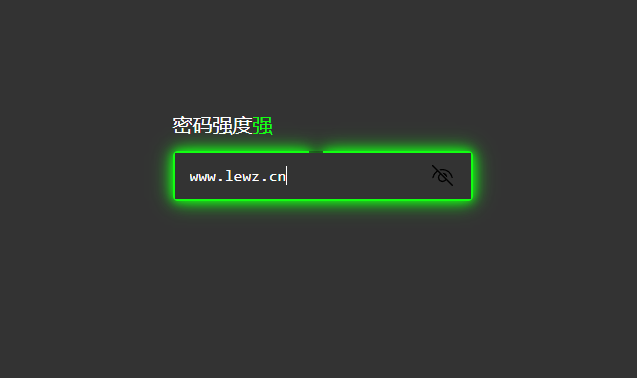
本文将详细介绍一款基于HTML、CSS和JavaScript编写的简单密码强度检查工具,已经汉化了,在输入密码的时候会实时显示强度和改变边框颜色。 示例代码 HTML <!DOCTYPE html> <html lang="en"> <head> <meta charset="UTF-8"> <meta name="viewport" content="width=device-width, initial-scale=1.0"> <title>密码强度检查</title> <link rel="stylesheet" href="./css/style.css"> </head> <body> <div class="box"> <h2>密码强度<span id="text">检查</span></h2> <input type="password" class="passwordInput" placeholder="请输入您的密码"> <div class="password-strength"></div> <div class="password-strength"></div> <div class="password-strength"></div> </div> <script src="./js/script.js"></script> </body> </html> style.css代码 * { margin: 0; padding: 0; box-sizing: border-box; font-family: consolas; } body { display: flex; justify-content: center; align-items: center; min-height: 100vh; background-color: #333; } .box { position: relative; width: 300px; height: 50px; } .box h2 { position: absolute; font-size: 1.25em; top: -40px; color: #fff; font-weight: 500; } .box input { position: absolute; inset: 2px; z-index: 10; border: none; outline: none; padding: 10px 15px; background-color: #333; font-size: 1em; color: #fff; } .box .password-strength { position: absolute; inset: 0; background: #111; border-radius: 5px; z-index: 1; } .box .password-strength:nth-child(3) { filter: blur(5px); } .box .password-strength:nth-child(4) { filter: blur(10px); } script.js代码 [xcxyzm]wicg[/xcxyzm] [sv] const passwordInput = document.querySelector('.passwordInput') const passwordStrengths = document.querySelectorAll('.password-strength') const text = document.getElementById('text') passwordInput.addEventListener('input', function(event) { const password = event.target.value const strength = Math.min(password.length, 12) const degree = strength * 30 // calulate degree value based on password strength const gradientColor = strength <= 4 ? '#ff2c1c' : (strength <= 8 ? '#ff9800' : '#12ff12') const strengthText = strength <= 4 ? '弱' : (strength <= 8 ? '中等' : '强') passwordStrengths.forEach(bar => { bar.style.background = `conic-gradient(${gradientColor} ${degree}deg, #1115 ${degree}deg)` }) text.textContent = strengthText text.style.color = gradientColor }) [/sv]
这个代码之前是在网上找到的然后拿来测试发现只要是网站用户登录成功和失败都会发送邮件到站长这,后面我就加了个判断。 我们首先通过get_user_by函数尝试获取尝试登录的用户的信息。然后,我们检查该用户是否存在,并且是否拥有administrator角色。只有当这两个条件都满足时,才会发送通知邮件。这样,只有当管理员账号登录时,您才会收到通知。 如果有人登录了系统,就会发一封邮件到邮箱,提醒你有人登录了,如果当时不是你登录,就要引起警惕了。 有人尝试登陆你的系统,但是没有成功,这种反复尝试的动作本身就需要被记录下来,发给博主,这样,只要有错误的登录,就会发一封邮件到自己的邮箱,将对方尝试的登录名和登录密码发送到你邮箱。 [xcxyzm]mVFI[/xcxyzm] [sv] 登录成功提醒 将以下代码放入主题的functions.php中 /***************************************************** 函数作用:有成功登录wp后台就会email通知 ******************************************************/ function notify_admin_login($user_login, $user) { date_default_timezone_set('PRC'); // 检查用户角色是否为管理员 if (in_array('administrator', $user->roles)) { // 设置邮件内容 $admin_email = get_bloginfo('admin_email'); $subject = 'WordPress后台登录成功提醒'; $message = '<p>你好!您的网站(' . get_option("blogname") . ')后台登录成功提醒!</p>' . "<p>登录名:{$user_login}</p>" . "<p>登录时间: " . date("Y-m-d H:i:s") . "</p>" . "<p>登录IP: " . $_SERVER['REMOTE_ADDR'] . "</p>"; // 设置邮件头部信息 $from = "From: WordPress Admin <no-reply@" . preg_replace('#^www\.#', '', strtolower($_SERVER['SERVER_NAME'])) . ">"; $headers = "$from\nContent-Type: text/html; charset=" . get_option('blog_charset') . "\n"; // 发送邮件 wp_mail($admin_email, $subject, $message, $headers); } } add_action('wp_login', 'notify_admin_login', 10, 2); 登录失败提醒 将以下代码放入主题的functions.php中 /***************************************************** 函数作用:有错误登录wp后台就会email通知 ******************************************************/ function notify_admin_login_failed($username) { date_default_timezone_set('PRC'); // 获取网站管理员的电子邮件地址 $admin_email = get_bloginfo('admin_email'); // 尝试获取用户信息 $user = get_user_by('login', $username); // 检查用户是否存在且是管理员 if ($user && in_array('administrator', $user->roles)) { // 设置邮件内容 $subject = 'WordPress后台登录失败提醒'; $message = '<p>你好!您的网站(' . get_option("blogname") . ')后台登录失败提醒!</p>' . "<p>登录名:{$username}</p>" . "<p>登录时间: " . date("Y-m-d H:i:s") . "</p>" . "<p>登录IP: " . $_SERVER['REMOTE_ADDR'] . "</p>"; // 设置邮件头部信息 $from = "From: WordPress Admin <no-reply@" . preg_replace('#^www\.#', '', strtolower($_SERVER['SERVER_NAME'])) . ">"; $headers = "$from\nContent-Type: text/html; charset=" . get_option('blog_charset') . "\n"; // 发送邮件 wp_mail($admin_email, $subject, $message, $headers); } } [/sv]
在WordPress中,删除文章时默认情况下并不会删除文章中使用的图片。如果你想要在删除文章的同时也删除文章内使用的图片,你可以考虑使用一些插件或编写一些自定义代码来实现这个功能。 通过编写自定义代码来实现,在主题的 functions.php 文件中添加以下代码: // 删除文章时同时删除文章内的图片 function delete_post_and_attachments($post_id) { $attachments = get_attached_media('', $post_id); foreach ($attachments as $attachment) { wp_delete_attachment($attachment->ID, true); } } add_action('before_delete_post', 'delete_post_and_attachments'); 请注意,这段代码将在文章被删除之前删除文章中使用的所有附件(包括图片)。确保在使用前备份你的网站数据,以避免意外删除重要文件。 无论你选择使用插件还是自定义代码,都应该在实际操作前对其进行充分测试,以确保功能正常运行且不会导致意外删除重要文件。
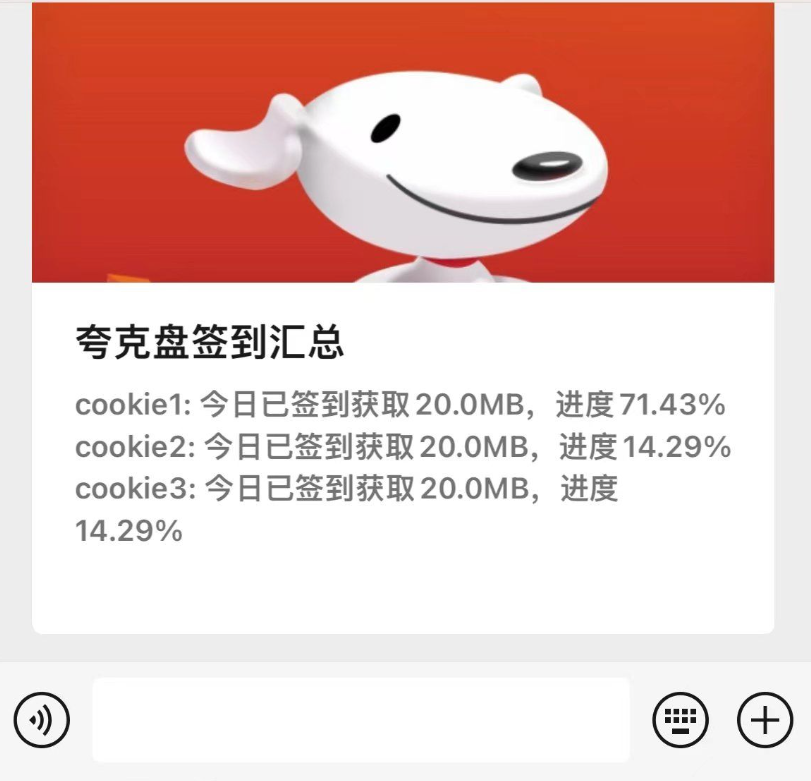
夸克网盘多账户签到及通知推送Python代码,之前发过PHP版自动签到代码今天发的可以挂到青龙面板,每次签到会自动推送消息到微信。 import requests import json import notify def check_request_response(response): """检查请求是否成功,并返回响应数据或打印错误信息""" if not response.ok: print(f"请求失败,状态码: {response.status_code}") return None return response.json() def quark_sign_in(cookie): state_url = "https://drive-m.quark.cn/1/clouddrive/capacity/growth/info?pr=ucpro&fr=pc&uc_param_str=" headers = {'Cookie': cookie} # 获取签到状态 state_response = requests.get(state_url, headers=headers) response_data = check_request_response(state_response) if not response_data: return False sign = response_data["data"]["cap_sign"] if sign["sign_daily"]: number = sign["sign_daily_reward"] / (1024 * 1024) progress = round(sign["sign_progress"] / sign["sign_target"] * 100, 2) message = f"今日已签到获取{number}MB,进度{progress}%" print(message) return message # 执行签到 sign_url = "https://drive-m.quark.cn/1/clouddrive/capacity/growth/sign?pr=ucpro&fr=pc&uc_param_str=" params = {"sign_cyclic": True} headers = {'Content-Type': 'application/json', 'Cookie': cookie} sign_response = requests.post(sign_url, headers=headers, json=params) data_response = check_request_response(sign_response) if not data_response: return None mb = data_response["data"]["sign_daily_reward"] / 2048 print(json.dumps(data_response)) return f"签到成功,获取到{mb}MB!" def main(): # 定义多个 cookie,每个 cookie 带有名称作为键 cookies = { "cookie1": "", "cookie2": "", # 继续添加更多 cookie } # 定义用于存储签到结果的字典 sign_results = {} # 循环遍历每个 cookie 并调用签到函数 for name, cookie in cookies.items(): print(f"正在签到 {name} ...") sign_message = quark_sign_in(cookie) if sign_message: sign_results[name] = sign_message else: sign_results[name] = "签到失败" notify.send("夸克盘签到异常", f"{name} 的签到失败!") # 输出所有账户的签到结果 print("\n签到结果:") for name, message in sign_results.items(): print(f"{name}: {message}") # 汇总所有签到信息 summary_message = "\n".join([f"{name}: {message}" for name, message in sign_results.items()]) # 使用 notify.send 发送汇总信息通知 notify.send("夸克盘签到汇总", summary_message) if __name__ == "__main__": main()
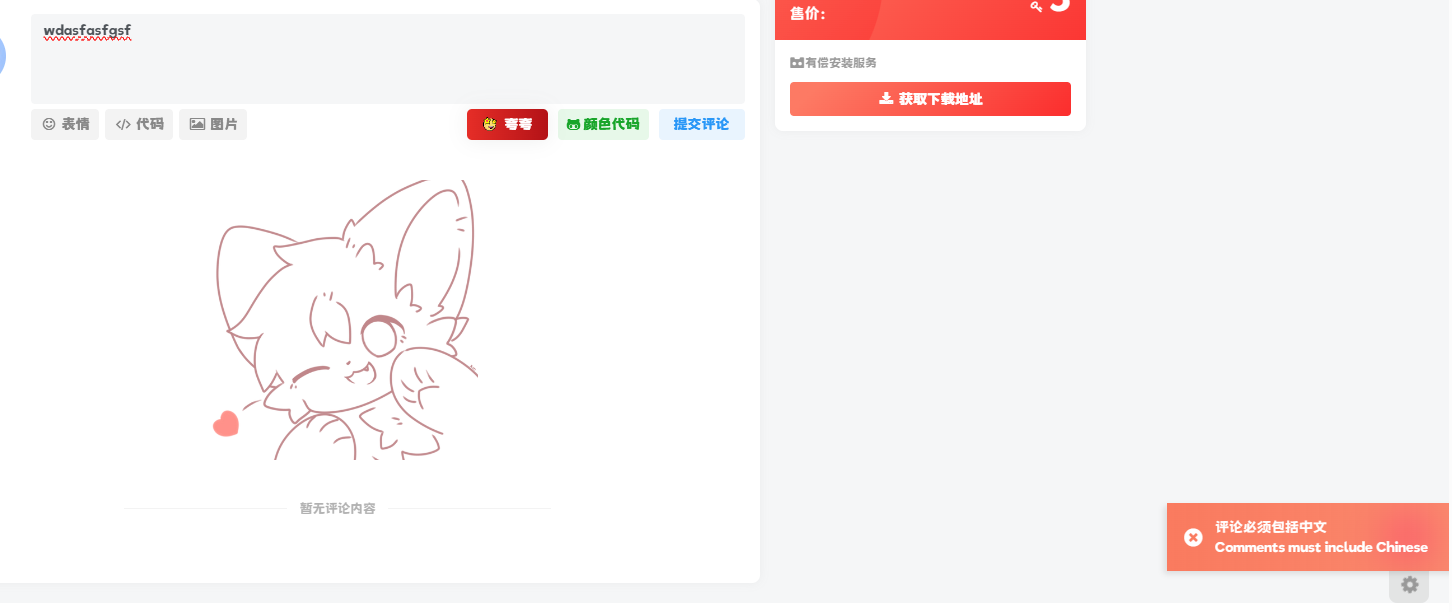
网站开通评论功能就会有垃圾评论的可能,这样会浪费很多的精力去处理,有些纯英文还有些附带网址,很多插件可以处理这种情况,但插件过多就会影响网站速度,今天就分享个不需要插件来实现屏蔽垃圾评论的功能,那就是给子比加个正则验证,限制评论纯数字/纯英文/纯表情。 使用教程 将代码放到/wp-content/themes/zibll/func.php文件即可。注意 此方法评论必须带中文 禁止了纯数字、纯字母和纯表情。 //屏蔽纯英文评论 function refused_english_comments($incoming_comment) { // 获取评论内容 $comment_content = $incoming_comment['comment_content']; // 去除评论内容中的 [g=xxx] xxx为任意字符串 $comment_content = preg_replace('/\[g=[^\]]*\]/', '', $comment_content); // 检查评论内容是否为空 if (empty($comment_content)) { wp_die('{"error":1,"ys":"danger","msg":"评论不能是纯表情内容 <br/>Comments cannot be purely emoji content"}'); } // 检查评论内容是否包含中文 $pattern = '/[一-龥]/u'; // 禁止全英文评论 if (!preg_match($pattern, $comment_content)) { wp_die('{"error":1,"ys":"danger","msg":"评论必须包括中文 <br/>Comments must include Chinese"}'); } return $incoming_comment; } add_filter('preprocess_comment', 'refused_english_comments');
每天发现网络新鲜事